Hospitality stock management

PowerEPOS Stock: know your GP, protect your profit

Stock and inventory management built into your POS. Cost every recipe, check every delivery, cut waste and see exactly where margin is slipping, with no second system to manage.

Already on PowerEPOS? Call 1300 784 666 to add Stock to your system.
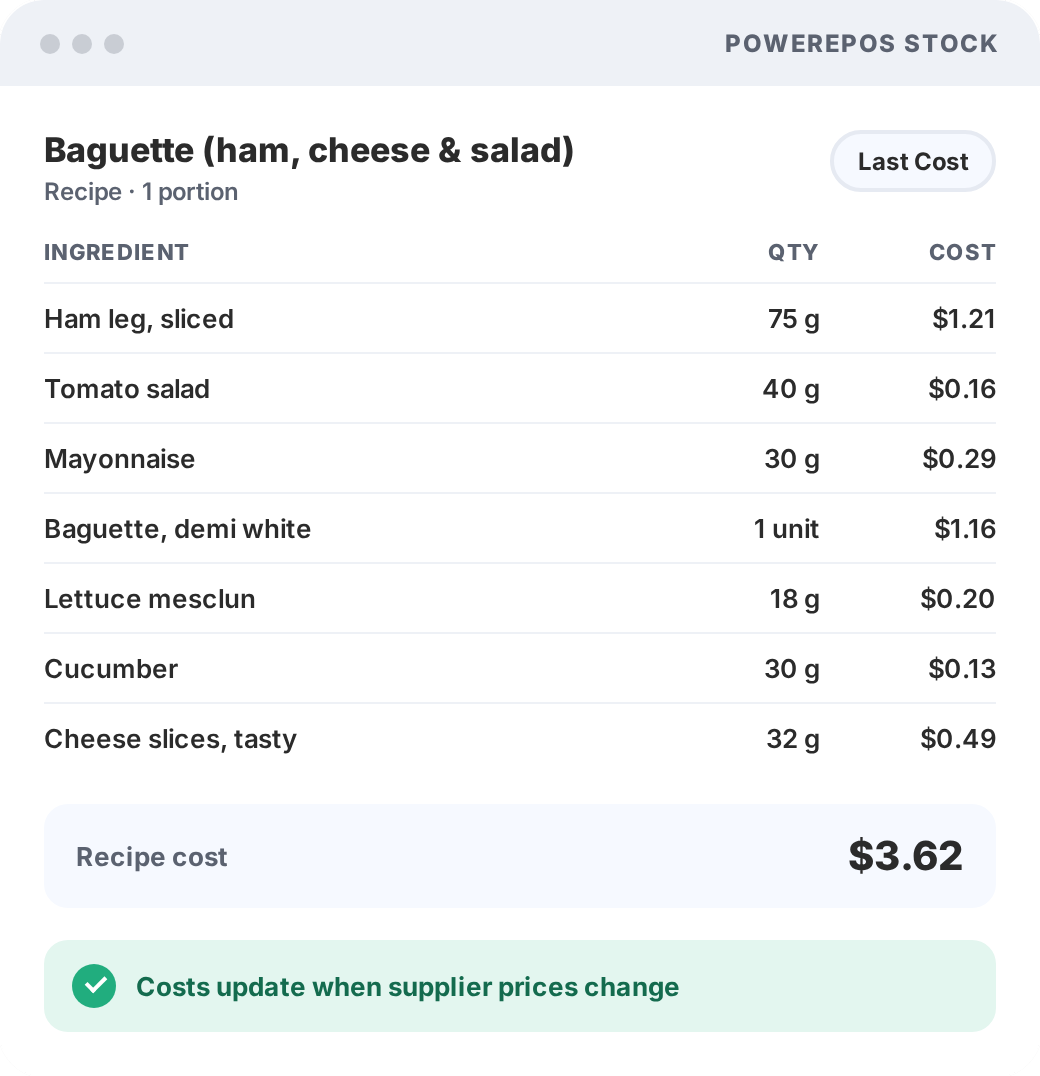
PowerEPOS Stock recipe costing screen showing each ingredient, quantity and cost for a menu item
  • Built into PowerEPOS, no double entry
  • Last Cost daily, FIFO at stocktake
  • Recipe and sub-recipe costing
  • Multi-site transfers and central warehouse
Why PowerEPOS Stock

A hospitality stock management system built into your POS

PowerEPOS Stock is the stock and inventory management module for PowerEPOS, our Australian-made hospitality POS. It handles purchasing, goods receiving, recipe costing, stocktakes, wastage and multi-site stock control, so cafés, restaurants, bars, pubs and hospitality groups always know what every product costs and what margin they're making.

1

Know your real costs

Supplier prices change all the time. PowerEPOS Stock values stock at the latest price you paid, so your recipe costs and GP stay current and your menu prices can keep up.

2

One system, not two

Stock is part of your POS. Add a menu item once, update a recipe once and train your team once. No exports, imports or double entry.

3

See where margin slips

Variance reports show what you should have against what you actually have, so over-portioning, waste and short deliveries stop being a guess.

How PowerEPOS Stock calculates your GP

Last Cost daily. FIFO at stocktake. The best of both.

Day to day, stock is valued at your most recent purchase price for a fast, real-time view of costs. When you finalise a stocktake, FIFO (First In, First Out) calculates your true Cost of Goods using the actual cost of each batch, in the order it was bought and used.

  • Fast daily reporting. Last Cost keeps your numbers current without heavy calculations running in the background.
  • Accurate Cost of Goods. FIFO gives you audit-ready figures at stocktake time.
  • Precise GP when it counts. Better pricing decisions, without slowing down service.
WORKED EXAMPLE

How flour is costed

  1. Week 1: buy 10kg of flour at $2.00/kg.
  2. Week 2: restock at $2.50/kg.
  3. Day to day: all flour is valued at $2.50/kg, the Last Cost.
  4. Stocktake finalised: FIFO applies $2.00/kg first, then $2.50/kg.
  5. Result: Cost of Goods based on what you actually paid, in the order you used it.
Last Cost vs FIFO in PowerEPOS Stock
 Last CostFIFO
When it is usedEvery day, as you tradeWhen you finalise a stocktake
How stock is valuedAt the most recent price you paidAt the actual cost of each batch, oldest first
What it gives youA fast, current view of costs and GPAccurate, audit-ready Cost of Goods
Best forDaily decisions and menu pricingMonth-end figures and your accountant
How it works

How POS stock management works with PowerEPOS

Our Australian implementation team works with you from day one, starting with your highest-value items so you see results quickly.

  1. STEP 1

    Set up

    We import your products, suppliers and opening stock levels, build your recipes with you and run an opening stocktake. Most venues are fully up and running within their first month.

  2. STEP 2

    Trade as normal

    Every sale deducts its recipe ingredients automatically. Purchase orders go to suppliers from your back office, and deliveries are checked against them on arrival.

  3. STEP 3

    Count and review

    Your team counts, the system does the maths. Finalise the stocktake to get FIFO Cost of Goods, then review variance, wastage and GP reports.

The features

Restaurant inventory management features that save time

Everything you need to control stock across your kitchen and bar, in the same system you use to trade.

Recipes and sub-recipes

Link menu items to ingredients, with sub-recipes for sauces and bases used across dishes. GP updates when ingredient costs change.

Purchasing

Create and email purchase orders to suppliers from your back office, with a clear audit trail and no paperwork.

Goods receiving

Check deliveries against what you ordered, see back orders, and catch price increases before stock is put away.

Automatic stock updates

Every sale deducts its recipe components from stock, so levels stay current with no manual adjustments.

Stocktakes

Your team counts and enters quantities, the system calculates variance and FIFO Cost of Goods. Multiple staff, no maths errors.

Wastage tracking

Record waste as it happens and categorise it by reason, such as spoilage, breakage, over-production or staff error.

Reporting

Variance, stock movement and GP reports by item, category, supplier or location, with Sales Analyst for the sales side.

Multi-site control

Central warehouse, inter-site transfers and consolidated purchasing, with stock visible across every venue.

Wastage tracking

Small leaks add up to big dollars

Most operators underestimate waste. Recording it by reason puts a real number on it, and the simple act of recording often brings it down.

Example: a venue turning over $50,000 a week with 30% cost of goods, wasting 2 to 5% of that stock, is throwing out $300 to $750 a week. That's $15,600 to $39,000 a year.

Recipe costing helps too: a $22 burger you think costs $6.50 to make (29.5%) might really cost $9.50 (43%) once every ingredient is counted.

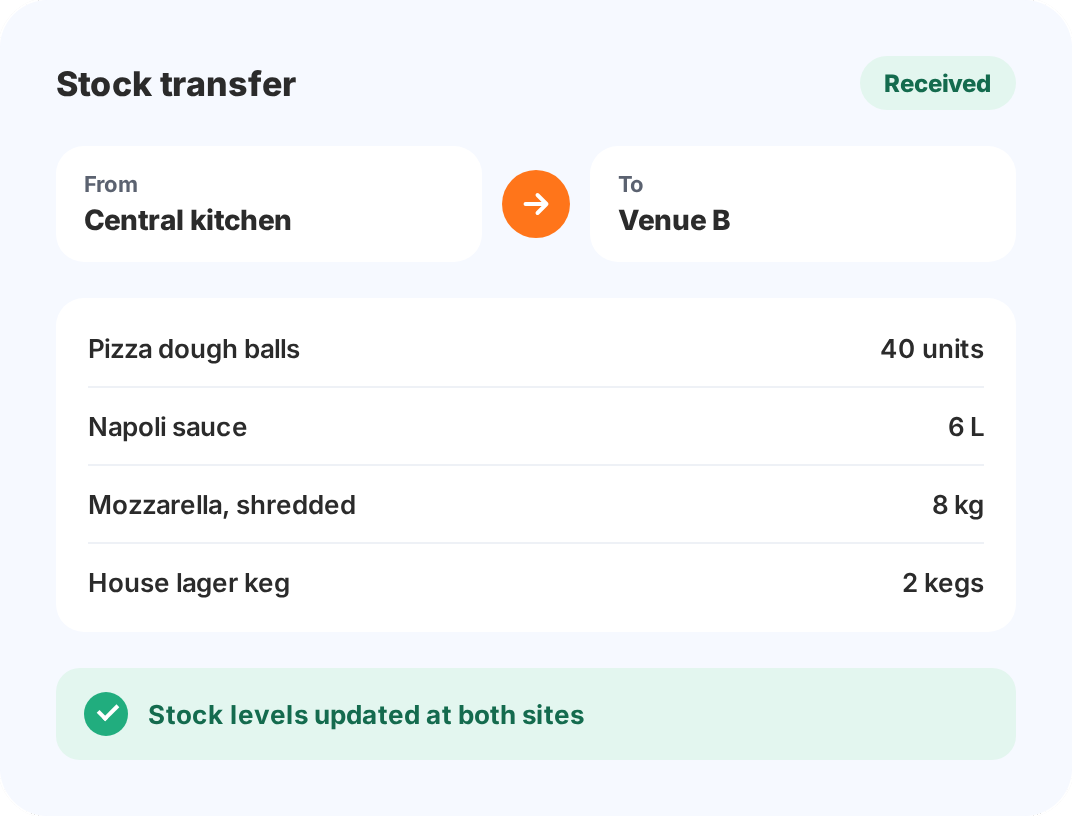
Multi-site stock transfer in PowerEPOS Stock moving items from a central kitchen to a hospitality venue
Multi-site stock management

Multi-site inventory management with centralised buying

Run a central warehouse or kitchen, move stock between venues and buy for the whole group, while every site keeps its own stock control and reporting.

  • Stronger buying power. Purchase for 5, 10 or 20 venues and negotiate volume rates.
  • Inter-site transfers with full tracking and a complete audit trail.
  • Less stock on hand across the group, with smarter distribution between locations.
  • Cloud-based and in sync, so you can check stock at any venue from any device.

Ideal for restaurant groups, franchises, venues with central kitchens, and stadiums and arenas.

One system, zero double entry

Built into PowerEPOS, not bolted on

Because Stock is part of your POS, changes flow through automatically. Update something once and it's right everywhere.

DO IT ONCE

No double data entry

  • Add a menu item once
  • Update a recipe once
  • Change pricing once
  • Train your team on one system
ALWAYS CURRENT

True real-time data

  • Sales update stock levels instantly
  • Deliveries update GP as they're received
  • Transfers between sites happen in real time
  • One Australian support team for POS and stock

Add PowerEPOS Stock to your Essentials, Signature or Premium bundle. It's charged per site, per month. See current prices on our pricing page.

Why Triniteq

Stock control on an Australian-made hospitality POS

AUSTRALIAN-MADE

Founded in Perth in 1997 and built for Australian hospitality, with your data stored in Australia.

LOCAL IMPLEMENTATION

Our Australian team helps set up your products, suppliers and recipes, and trains your staff.

ZERO TRANSACTION FEES

We don't take a cut of your sales. Choose from 20+ payment processors and switch without changing your POS.

CAFÉS TO STADIUMS

One platform for thousands of venues, from single cafés to multi-site groups and major stadiums.

Talk to an Expert

Still not sure which POS is right for your business? Want to discuss your requirements in more detail or book a demo? Well, we want to hear from you. Click the 'Contact Us' button and submit your details, call us (1300 784 666), or book a demo using our handy scheduler. We’re waiting to hear from you.

Book a Demo
Call: 1300 784 666
Contact Us
FAQ

POS Stock & Inventory Management FAQs

What is a POS with stock management?

A POS with stock management combines point of sale and inventory control in one system. PowerEPOS Stock deducts inventory automatically when sales are processed, links menu items to ingredient recipes, and gives you real-time stock visibility without separate stock software or double data entry.

Does PowerEPOS have inventory management?

Yes. PowerEPOS Stock provides full inventory management built into the POS. Features include Last Cost and First In, First Out (FIFO) stock tracking, recipe costing, purchase orders, goods receiving, stocktakes, wastage tracking, multi-site stock control and automatic stock deductions from sales.

What is Last Cost stock tracking?

Last Cost values your stock at the most recent price you paid for that ingredient or product. When a supplier price changes and you receive a new delivery, that price becomes the current cost across your daily reporting straight away, giving you a fast, current view of costs and stock movement.

What is FIFO stock management in a POS system?

FIFO (First In, First Out) values stock using the actual cost of each batch, assuming the oldest stock is used first. PowerEPOS Stock applies FIFO when you finalise a stocktake, so your Cost of Goods and gross profit reflect what you really paid, even when supplier prices change often.

How long does a stocktake take with PowerEPOS Stock?

Your team counts and enters quantities, and the system does all the calculations, including variance and FIFO Cost of Goods. Venues moving from paper typically go from a 4 to 5 hour stocktake to 1 to 2 hours.

How does PowerEPOS Stock help reduce wastage?

Staff record waste as it happens and categorise it by reason, such as spoilage, breakage, over-production or staff error. PowerEPOS Stock calculates the cost automatically, so you can see where money is going and act on it. Recording waste also makes teams more mindful of it.

Can PowerEPOS manage stock across multiple locations?

Yes. PowerEPOS Stock provides cloud-based multi-site inventory management with a central warehouse, inter-site stock transfers, consolidated purchasing and individual site reporting. Restaurant groups, hospitality groups and franchises can use their buying power while keeping site-level stock control.

How does integrated POS and stock management save time?

It removes double data entry. You add menu items, recipes and pricing once instead of updating separate POS and stock systems. PowerEPOS Stock deducts inventory automatically when sales occur, so your POS and stock data always match.

How long does it take to set up PowerEPOS Stock?

Setup typically takes 2 to 4 weeks, depending on your menu and number of locations. This includes importing your product list, building recipes, setting up suppliers and entering opening stock levels. Our implementation team trains your staff and starts with your highest-value items, and most venues are fully up and running with recipe costing within their first month.

What happens to our existing stock data?

PowerEPOS Stock can import your existing product lists, suppliers and opening stock levels from spreadsheets or your current system, and our implementation team helps make sure it is accurate. You then do an opening stocktake, and from that point the system tracks every stock movement.

Can PowerEPOS Stock integrate with our accounting software?

Yes. PowerEPOS Stock integrates with MYOB, exporting daily sales summaries, payment breakdowns and stock values without manual data entry. Other accounting integrations are available depending on your requirements. See our integrations.

How much does PowerEPOS Stock cost?

PowerEPOS Stock is a monthly subscription charged per site, and it can be added to the Essentials, Signature or Premium bundle. For current prices, visit our pricing page or call 1300 784 666.