PowerEPOS Sales Analyst: know what's working
Turn your POS data into clear answers. Drill into product margins, compare venues, track staff performance and have the reports you rely on land in your inbox, right on schedule.
Already on PowerEPOS? Call 1300 784 666 to add it. Your history is ready from day one.
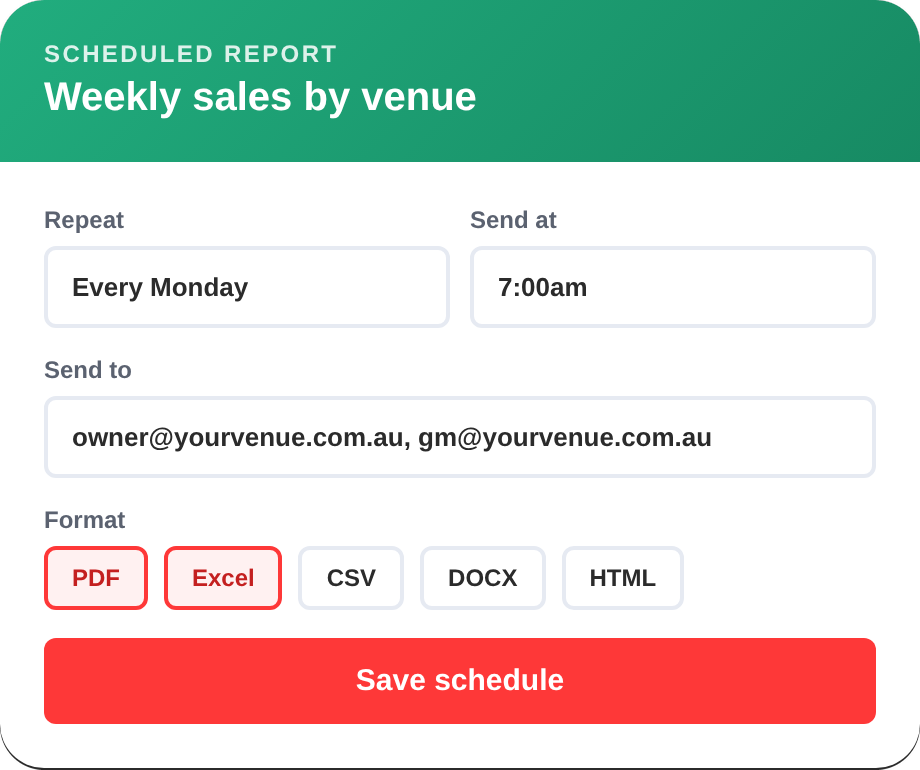
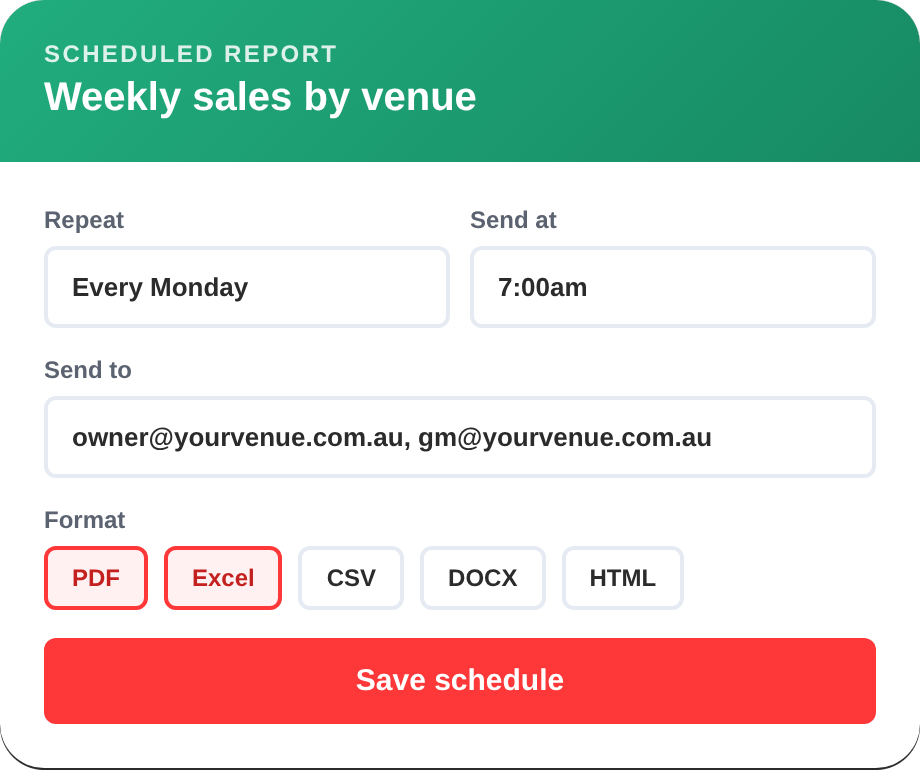
- Scheduled reports to any inbox
- Export to PDF, Excel, CSV and more
- No per-user fees
- All your history from day one
Hospitality reporting software that turns POS data into profit
PowerEPOS Sales Analyst is an advanced reporting and analytics module for PowerEPOS, our Australian-made hospitality POS. It gives Australian cafés, restaurants, bars, pubs and multi-site groups detailed, customisable reports built on their own sales data, so every decision is backed by numbers, not gut feel.
Restaurant groups
Compare performance across locations to find your top performers and repeat what works. Track sales, food costs and labour ratios across the whole portfolio.
Café chains
See how product mix changes from site to site, so you can match menus and stock to local demand and keep operations consistent as you grow.
Bars and pubs
Read your trading patterns to staff every shift properly. Track promotions, watch your high-margin lines and cut waste with variance reporting.
In-depth reporting without the complexity
Sales Analyst gives you the depth of a business intelligence tool with the simplicity of your POS. Set it up once and the right numbers find the right people.
- Multi-layered analysis. Filter and combine criteria like site, product, time period and staff member to answer the exact question you have.
- Scheduled reports. Send daily, weekly or monthly reports to any inbox, automatically.
- Export any way you like. PDF, Excel, CSV, Text, Image, HTML and DOCX.
- Save and share templates. Build a report once and share it across your team, so everyone works from the same numbers.
- Receipt-level detail. View and email individual receipts when you need to check a transaction.
- Access from anywhere. Check your reports from the office, at home or on the road.
From sales data to decisions in three steps
Sales Analyst adds to your PowerEPOS system in minutes, with no installation charges and no disruption to trade. It uses the same login as PowerEPOS Insights.
-
STEP 1
Pick a report
Start with a ready-made report or one of your saved templates. Your full PowerEPOS sales history is already there.
-
STEP 2
Slice the data
Filter by site, product, category, time period or staff member, and layer criteria to dig as deep as you need.
-
STEP 3
Act and automate
Export it, share the template with your team, or schedule it to arrive in the right inboxes at the right time.
Restaurant and café reports that answer real questions
Every report can be customised with multiple criteria, so you see exactly the slice of your business you need.
Sales performance
Sales by hour, day, week and month, with time-based trends and comparisons against past periods.
Product mix and categories
See what sells, what makes money and what just takes up menu space. Find your high-margin items fast.
Staff performance
Track sales by team member and spot the staffing patterns behind your best and quietest shifts.
Waste and variance
Variance reporting shows where stock and money are slipping, so you can fix it before it adds up. Pair it with PowerEPOS Stock for full inventory control.
Multi-venue comparisons
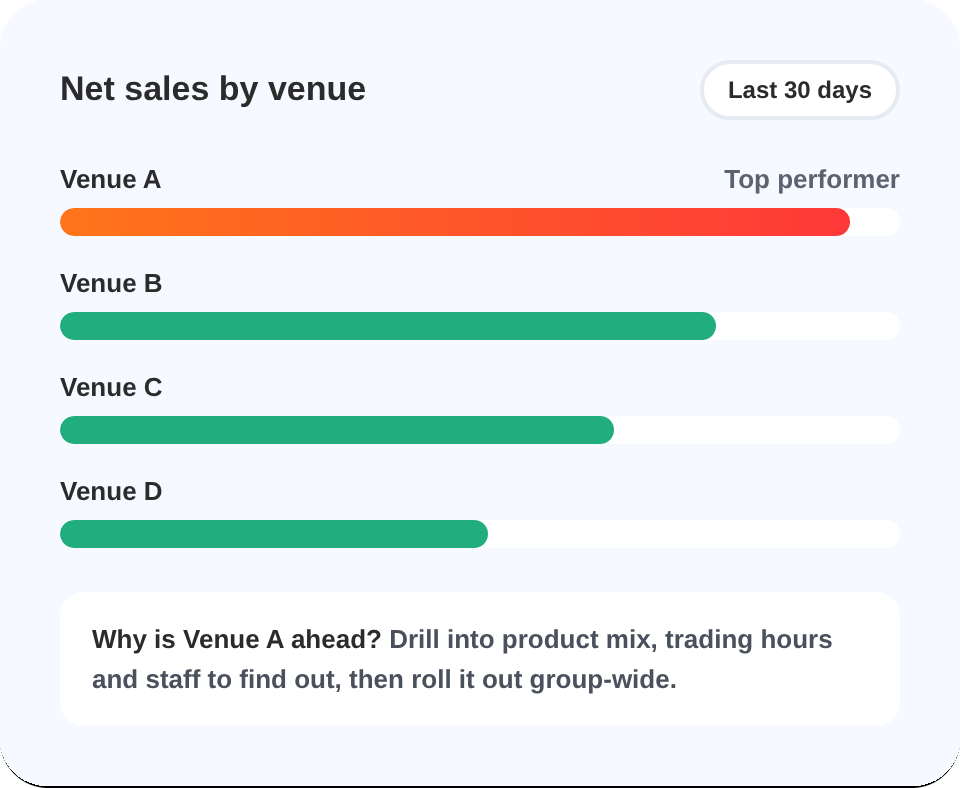
Put venues side by side to see why one outperforms another, then repeat what works across the group.
Promotions and receipts
Measure how promotions really performed, and drill down to receipt-level transaction lists and Z reports.
Not sure where to start? Read the 10 essential reports guide →
10 essential reports that increase profits in hospitality
Find out which reports every hospo operator should be checking, what to look for in each one, and how to use them to lift revenue and protect your margins.
Multi-site POS reporting from a single source of truth
When you run more than one venue or outlet, Sales Analyst gives head office and venue managers the same numbers, in the same format, without the spreadsheet juggling.
- Compare venues across your whole portfolio and see what drives top performance.
- Up-to-date figures across every location in one place.
- Invest with confidence by putting money where the data says it will work hardest.
- Grow without extra admin. Add sites and keep the same reports and templates.
Sales Analyst or Insights Lite?
Both run on your PowerEPOS data. Sales Analyst includes everything in Insights Lite, then goes much deeper.
PowerEPOS Sales Analyst
For operators who want to dig into the detail, automate reporting and share it across a team or group.
- Everything in Insights Lite
- Multi-layered analysis with custom criteria
- Scheduled reports and flexible export formats
- Shared templates and receipt-level detail
- Included in the Signature and Premium bundles, or add it to the Essentials bundle
PowerEPOS Insights Lite
Live dashboards and quick sales snapshots for keeping an eye on trade day to day.
- Live dashboards and snapshots
- Core sales reporting
- Works on mobile and desktop
- Included in every PowerEPOS bundle
| Feature | Insights Lite | Sales Analyst |
|---|---|---|
| Live dashboards and snapshots | Yes | Yes |
| Core sales reporting | Yes | Yes |
| Mobile and desktop access | Yes | Yes |
| Multi-layered analysis with custom criteria | No | Yes |
| Scheduled reports emailed to any inbox | No | Yes |
| Export to PDF, Excel, CSV, Text, Image, HTML and DOCX | No | Yes |
| Save and share report templates | No | Yes |
| Receipt-level transaction detail | No | Yes |
| Per-user fees | None | None |
| Included in bundles | Every PowerEPOS bundle | Signature and Premium |
Simple monthly pricing per site, no per-user fees. See current prices for Sales Analyst, Insights Lite and every bundle on our pricing page.
Reporting on an Australian-made hospitality POS
Founded in Perth in 1997 and built for Australian hospitality, with your data stored in Australia.
Our Australian team helps by phone, email and remote session, with no extra support charges.
We don't take a cut of your sales. Choose from 20+ payment processors and switch without changing your POS.
One platform for thousands of venues, from single cafés to multi-site groups and major stadiums.
Got Questions? Talk to an Expert
Still not sure which POS is right for your business? Want to discuss your requirements in more detail or book a demo? Well, we want to hear from you. Click the 'Contact Us' button and submit your details, call us (1300 784 666), or book a demo using our handy scheduler. We’re waiting to hear from you.
Sales Analyst FAQs
What is PowerEPOS Sales Analyst?
Sales Analyst is an advanced reporting and analytics module for PowerEPOS. It turns your POS transaction data into detailed, customisable reports, with multi-layered analysis, scheduled report delivery and receipt-level detail. It is designed for cafés, restaurants, bars, pubs and multi-venue operations.
How much does Sales Analyst cost?
Sales Analyst is a monthly subscription charged per site, and it includes Insights Lite. It is also included in the Signature and Premium bundles. There are no installation fees, training charges or per-user fees, and support and software updates are included. For current prices, visit our pricing page or call 1300 784 666.
What's the difference between Sales Analyst and Insights Lite?
Insights Lite gives you live dashboards, snapshots and core sales reporting on mobile and desktop. Sales Analyst includes Insights Lite and adds multi-layered analysis with custom criteria, scheduled reports, flexible export formats, shared report templates and receipt-level transaction detail.
Do I need PowerEPOS to use Sales Analyst?
Yes. Sales Analyst is built for PowerEPOS and needs an active PowerEPOS subscription. It reports on your PowerEPOS data and uses the same login as PowerEPOS Insights.
Can I see my historical sales data?
Yes. Sales Analyst gives you access to all your historical PowerEPOS transaction data from day one, with no data migration or extra setup. You can compare current results with any past period.
What reports can Sales Analyst create?
Sales Analyst covers sales performance by day, week and month, product mix and category analysis, staff performance, waste and variance, multi-venue comparisons, time-based trends, promotional performance, transaction patterns and receipt-level transaction lists. Every report can be customised by site, product, time period, staff member and more.
What reports should a restaurant check every week?
Most restaurants get the most value from checking sales by day and hour, product mix and margins, staff performance, and waste and variance every week. Comparing each against the same period last year shows real trends rather than one-off spikes. Sales Analyst can email these reports to you automatically every week. For the full list, read our 10 essential reports guide.
How can multi-site hospitality groups compare venue performance?
Use one reporting system that pulls every venue's sales into the same format. With Sales Analyst, you can put venues side by side by sales, product mix, trading times and staff performance, see why one venue outperforms another, and roll out what works across the group.
Can I schedule automated reports?
Yes. You can schedule your key reports to be created and emailed automatically to any address, daily, weekly or monthly, so your team always has current figures without running reports by hand.
What formats can I export reports in?
Sales Analyst reports export to PDF, Excel, CSV, Text, Image, HTML and DOCX, so you can share them with stakeholders or analyse them further in a spreadsheet or business intelligence tool.
Is Sales Analyst suitable for multi-site groups?
Yes. Sales Analyst is ideal for multi-site and franchise operations. You can compare performance across all your locations, see why some venues outperform others, and give head office and venue managers one source of truth without manual spreadsheets.
Can multiple team members use Sales Analyst?
Yes, with no per-user fees. Save and share report templates across your organisation so everyone works from the same data, and control access levels as needed.
What support is included with Sales Analyst?
Australian-based support is included in your subscription. Our local team helps by phone, email and remote assistance, and you also get training resources, video tutorials and our online knowledge base at no extra cost. See support and training.