A few weeks ago, I was catching up with some of our customers and the conversations kept coming back to the same theme: how do we make more from the customers already walking through the door?
It's a smart question. Foot traffic is harder to control than it used to be. But average spend per customer? That's something a well-configured POS can actually move.
What struck me during those conversations was that most venues weren't using PowerEPOS anywhere near its potential when it came to upselling and cross-selling. The tools were right there. They just hadn't been set up to do the work.
So I put together a detailed configuration review for one of our customers, walking through every section of their menu and mapping out exactly how PowerEPOS could prompt staff to have the right conversations at the right moments.
After I sent it, I realised this is something almost every venue could benefit from. So here's the thinking behind it, written for any hospitality operator running table service, counter service, or anything in between.
The Problem: Upselling Relies on Memory (& memory can fail during service)
Ask any venue manager and they'll tell you their staff know they're supposed to suggest sides, ask about drinks, mention the daily special. And they do, sometimes, when it's quiet and they have headspace.
But during a Saturday lunch rush? It goes out the window. Staff are moving fast, tables are turning, and the mental load of running service doesn't leave much room for "would you like to add a side salad to that?"
The fix isn't more training. It's building the prompt into the POS itself, so the right suggestion appears on screen at the right moment, without relying on anyone to remember.
That's what PowerEPOS is built to do.
The Three Features That Do the Heavy Lifting
Before getting into specific setups, it's worth understanding the three PowerEPOS features that make this work.
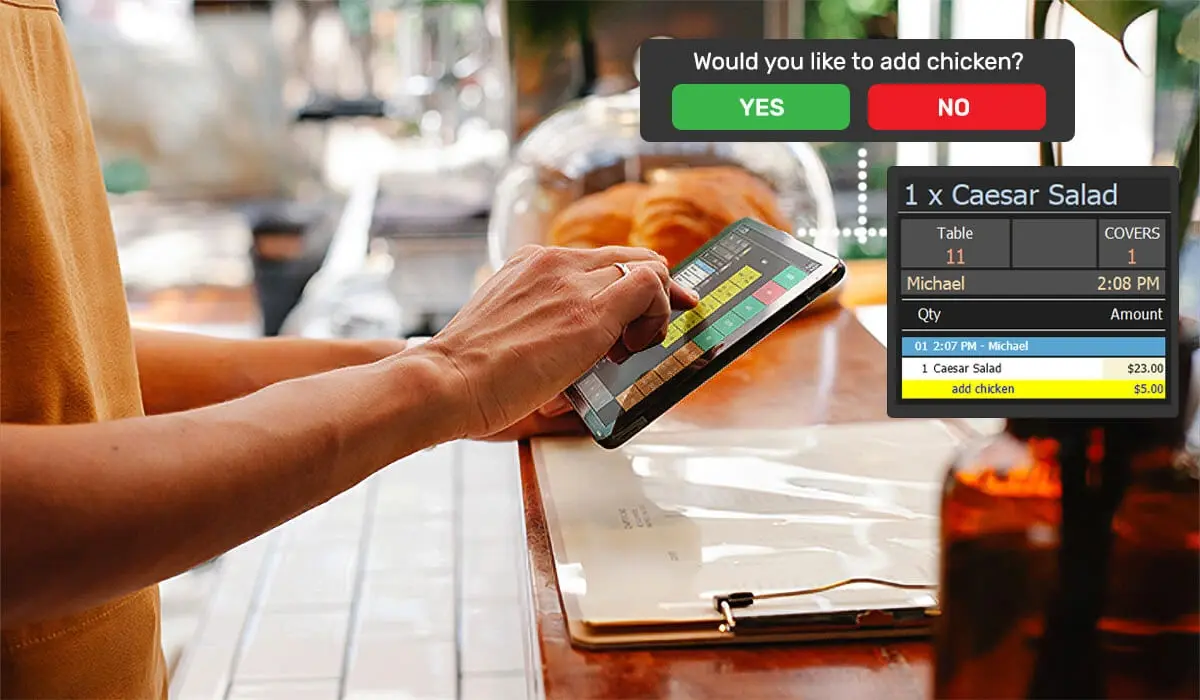
Follow Pages are the most powerful tool for driving upsells. When a staff member selects a product on the POS, a follow page automatically appears prompting them to offer something related. It could be sides with a main, a beverage with breakfast, or a dessert with a kids meal. The prompt is built into the workflow, so it happens every time, not just when someone remembers.
Product Enquiry Notes let you add information to any product that appears on screen when a staff member selects it. Think wine tasting notes, food pairing suggestions, allergen flags. This is particularly useful for venues with a curated wine or beer list, where staff confidence in talking about wine or craft beer directly influences whether a customer orders a second glass or upgrades their choice.
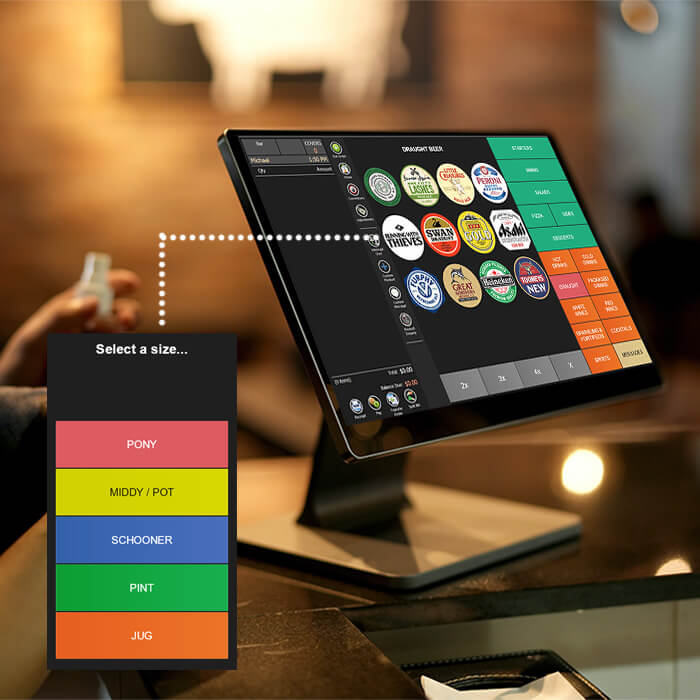
Variations let you build size and option choices directly into a product's page on the POS. Instead of a staff member saying "sorry, I'll have to check if we do a large," the options are right there in front of them. Pints vs schooners, regular vs large, extra shot or not. The variation is offered as part of the ordering process, not as an afterthought.
Used together, these three features turn your POS into a quiet upsell engine running in the background of every transaction.
How This Looks in Practice
This isn't theoretical. Here's how I think about configuring PowerEPOS across different parts of a typical venue menu.
Breakfast and brunch are one of the easiest wins. Every breakfast item can trigger a follow page to beverages, since plenty of customers will add a coffee or juice when prompted but wouldn't necessarily think to ask. For applicable dishes, a follow page to extras (think sides like bacon, avocado, or similar additions specific to your menu) gives staff the nudge to ask the question. Adding a beverage option as part of a single ordering flow, rather than a separate trip back to the table, reduces friction for the customer and increases the chance they say yes.
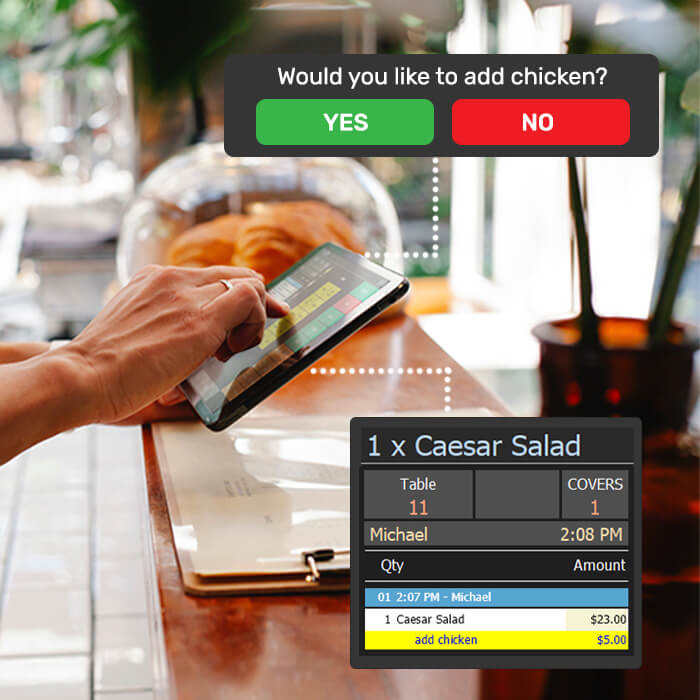
Mains at lunch and dinner benefit most from a follow page to sides. When every main automatically prompts a sides suggestion, the conversation becomes part of the service flow rather than an upsell that feels awkward. If your menu has a dish where a common add-on is priced separately (a salad with optional protein, for example), a follow page can prompt that specific suggestion with the price included, so the staff member is armed with exactly what to say.
The bar and beverage section is where variations do a lot of work. Tap beers configured with size variations (schooner, pint), coffee orders configured with shot and milk options, or soft drinks with size options all ensure that the conversation about upgrades happens every time, not just for regulars who know to ask.
Kids menus are an overlooked upsell opportunity. Adding a dessert option directly to the kids menu page on POS means staff are prompted to offer it as part of the ordering process. Parents are often happy to say yes when it's suggested simply and clearly, they just don't think to ask.
Wine and beverage lists are where product enquiry notes make the biggest difference. Adding tasting notes and food pairing suggestions to each wine product means staff can answer "what goes well with the lamb?" confidently, without having to guess or disappear to find the sommelier. A staff member who can describe a wine in two sentences sells more wine. It's that straightforward.
One Thing Worth Knowing
All of this relies on staff taking orders on a POS terminal or tablet. If your team is still using docket books at the table, the POS prompts can't fire at the right moment.
For venues moving toward tablet ordering or counter service, this is worth building into the configuration from day one. For venues not ready to make that shift yet, it's a conversation worth having when the time comes. We're always happy to help think through what that would look like for your specific setup.
The Bigger Picture
None of this is about pressuring customers into spending more. It's about giving your staff the tools to have natural, confident conversations at the right moment. A well-placed suggestion during ordering doesn't feel like a hard sell. It feels like good service.
The venues getting the most out of PowerEPOS aren't necessarily the biggest or the most complex. They're the ones who've taken the time to configure their menus to work with their service style. It's a one-time setup that keeps paying off across every shift, every service, every cover.
If you'd like us to do a configuration review for your venue, get in touch. It's the kind of thing we genuinely enjoy helping with, and the results often surprise people.
Call us on 1300 784 666 or email us to talk to the team.
If you're seeking a quality, Australian-made and supported Point of Sale solution for your hospitality or retail business, look no further than Triniteq.
Our innovative technologies and high-quality service are designed to simplify operations, enhance customer experience, and make you more money.
Discover our range of products and services today.
If you're new to Triniteq and PowerEPOS, our new cloud-hybrid POS system, contact us for more info.


Related articles
PowerEPOS is built as a cloud-hybrid POS, meaning it keeps taking orders and processing ...
PowerEPOS is built to handle the operational complexity of Australian hotels and pubs, ...
PowerEPOS integrates directly with MYOB AccountRight, automatically posting sales data ...