Café POS built for the coffee rush
PowerEPOS is an Australian-made café POS system that keeps coffee orders moving, keeps you trading when the internet drops and lets you choose your own payment provider. It runs everything from a single café to a multi-site group.
Pricing your setup? See café POS pricing.
Trusted by cafés and coffee shops across Australia




- 1,000's of Australian venues
- 20+ integrated payment providers
- Australian support, during and after hours
- Hospitality POS since 1997
One café POS for every style of service
Whether you open at 6am or trade late into the evening, most cafés move between quick counter service, order-and-sit and full table service. PowerEPOS handles every style on one system, so your team never has to change screens, devices or workarounds as service changes.
-
Counter service
The rush
Coffee and takeaway, fast, whenever your peak hits.
- Quick Sale screens built around your coffee menu
- Dine in or takeaway set on the same order
- Bistro Mode for several orders on the go at once
- Kitchen display screens (KDS) at the coffee machine, bar or kitchen
-
Order, then sit
Order at the counter, then sit
Customers order up front, then find a seat.
- Table numbers so food is run to the right table
- Move a counter order to a table in a tap
- Coffee dockets to the machine, food to the kitchen or KDS
-
Table service
When the tables fill up
Switch to table service without switching systems.
- Floor plan with live table status
- Handheld ordering at the table
- QR code ordering at the table with our me&u integration
- Split bills by item or portion
-
Wind down and close
Quieter trade, then close
However late you trade, finish the day cleanly.
- Update specials from the touchscreen
- End-of-day reports without the spreadsheet
- Check sales on any device, wherever you are
Coffee ordering that keeps up with your baristas
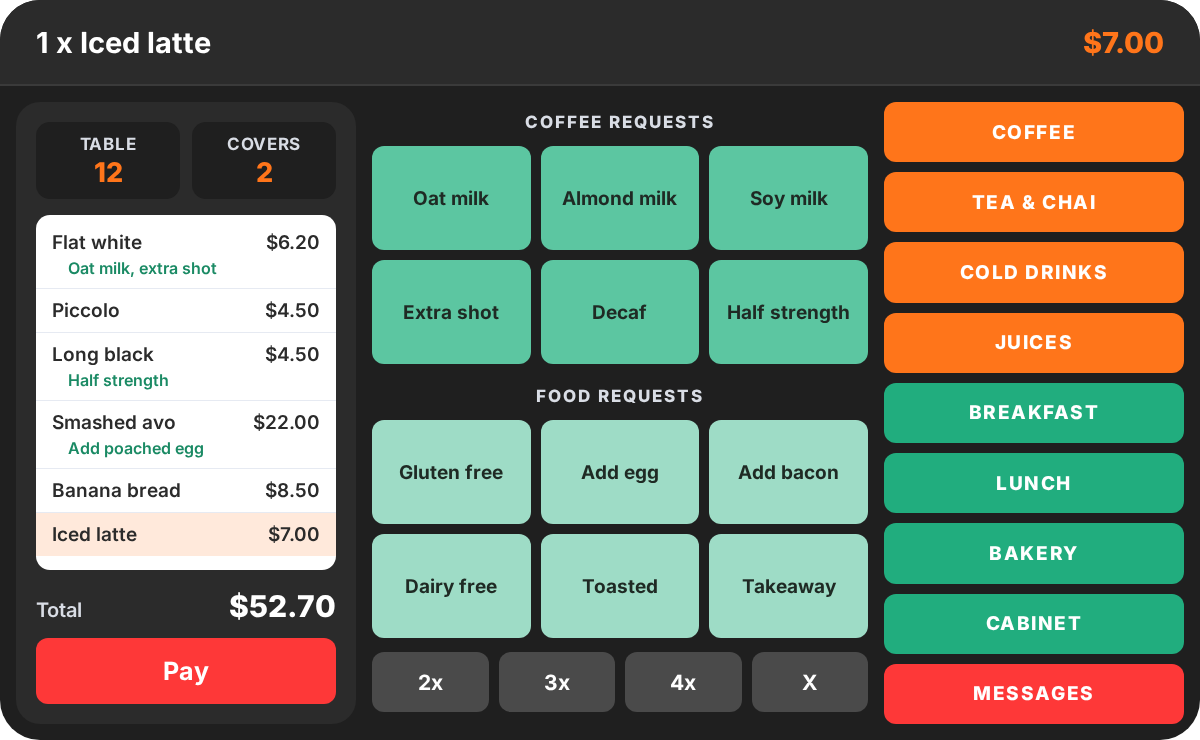
Coffee is where a café POS earns its keep. PowerEPOS puts your whole espresso menu and every milk and extra on screen, so orders go in fast and reach the machine exactly as the customer asked.
- Your full coffee menu as buttons, from flat whites and piccolos to cold brew, batch filter and matcha.
- Milk alternatives and extras as quick modifiers, including oat, almond, soy, lactose free, extra shot, decaf and half strength, each priced your way.
- Coffee and food sent to the right place. Coffee orders go to the machine and food goes to the kitchen, on dockets or kitchen display screens (KDS).
- KDS for busy cafés. Put screens at the coffee station, bar or kitchen, and staff clear finished orders with a bump bar. Run kitchen printers alongside your screens if you like.
- Digital receipts by SMS or email, so you can cut back on paper.
Why Australian cafés choose PowerEPOS
Fast coffee service matters. So does what happens around it: what you pay, who answers the phone, and whether you can keep trading on a bad internet day.
Choose your own payment provider
PowerEPOS works with 20+ payment providers, so you pick the EFTPOS provider and rates that suit your café. If a better deal comes along, you can switch providers without changing your POS.
Triniteq charges no transaction fees. You pay one predictable monthly fee, so your POS costs don't rise as your café gets busier.
Keeps trading when the internet drops
PowerEPOS is cloud-hybrid. If your café Wi-Fi or NBN drops mid-rush, you keep serving, and everything syncs back to the cloud once you are reconnected.
Australian support, during and after hours
Talk to a support team based in Australia, in your time zone, not an overseas call centre. We install and train remotely, or on-site by request.
Australian-made since 1997
PowerEPOS is certified Australian Made by Triniteq, a hospitality POS company founded in Perth in 1997 and now supporting venues nationwide.
Grows with your café
Add terminals, handhelds or a second site whenever you are ready. The same platform runs café groups, multi-site venues and major stadiums.
What café owners say about PowerEPOS
Café operators across Australia rate PowerEPOS for being easy to use and for support that actually picks up the phone.
A very easy system to use with great analytical tools in the background. Plenty of tech support available to help when necessary.
The team at Triniteq are awesome. They are super easy to work with and they have great staff members that always help out if I have any issues or questions. Highly recommend!
Great service and quick call backs. Easy to use system front and back of house. No issues.
User friendly. Most of the changes we can do by ourselves. Highly reliable support service.
Add what your café needs, when it needs it
Start with the core café POS, then switch on add-ons and connect the apps you already use. No rebuild, no second system.
Café add-ons
Built to work with PowerEPOS from day one.
- LoyaltyReward your regulars with points and offers. Loyalty is a separate program seamlessly integrated with PowerEPOS.
- Gift Cards & VouchersSell plastic, printed and digital gift cards in store or online.
- Accounts ManagerRun house accounts for local businesses and regular customers, with digital membership cards.
- PowerEPOS StockTrack stock, recipes and costs, from coffee beans and milk to your counter cabinet.
- Sales AnalystSpot your best sellers, busiest hours and quiet days, and plan around them.
Café integrations
Orders, payments, payroll and accounts flow into one place.
How to switch your café to PowerEPOS
Changing your café POS should not mean closing for a day. Here is how we get you set up, in four steps.
-
01
Book a discovery call
Tell us how your café runs: your menu, service style, hardware and payment provider. We will recommend a setup to suit.
-
02
We build your setup
Our team configures your menu, coffee modifiers and screen layouts. Use new hardware from us or compatible Windows devices you already own.
-
03
Install and training
Guided remote installation and onboarding, with on-site installation by request. Most staff pick up PowerEPOS quickly.
-
04
Trade with local support
Open the doors knowing Australian-based support is there during and after hours, plus our own POS repairs workshop.
Need hardware? Browse touchscreens, printers and cash drawers in our POS hardware shop, or read about our support and training.
Download the PowerEPOS for Cafés guide
See how PowerEPOS works in a café or coffee shop, from the front counter to the back office.
- How PowerEPOS can help your café make more money
- Features that simplify café operations
- Fast, accurate and flexible customer service
- How POS integrations can save you time every week
Let's get your café running on PowerEPOS
Talk to our Australian team on 1300 784 666
Café POS system FAQs
What is the best POS system for cafés in Australia?
The right café POS takes coffee orders fast, handles counter and table service in the same venue, and keeps trading when your internet drops. PowerEPOS is an Australian-made café POS that does all three, works with 20+ integrated payment providers and comes with Australian-based support during and after hours.
How much does a café POS system cost?
PowerEPOS is a monthly software licence, and Triniteq charges no transaction fees, so your POS cost stays the same as your sales grow. Hardware is separate: buy it from us or use compatible Windows devices you already own. See current café pricing on our POS pricing menu.
Is PowerEPOS a good POS for a small café or coffee shop?
Yes. PowerEPOS runs single cafés and coffee shops with one terminal as well as large venues. It is quick to learn, so new staff pick it up fast, and you can add terminals, handhelds or extra sites as your café grows.
Does PowerEPOS work without internet?
Yes. PowerEPOS is a cloud-hybrid POS, so your café keeps serving if your internet connection drops. Everything syncs back to the cloud automatically once you are reconnected.
Can I choose my own payment provider with PowerEPOS?
Yes. PowerEPOS integrates with 20+ payment providers, so you choose the EFTPOS provider and rates that suit your café, and you can switch providers later without changing your POS. Triniteq charges no transaction fees. See our integrations for the full list.
Does PowerEPOS handle coffee modifiers and milk alternatives?
Yes. You can set up your full coffee menu with modifiers for milk alternatives such as oat, almond, soy and lactose free, plus extras like extra shot, decaf and half strength, each with its own price. Coffee dockets can print at the coffee machine while food goes to the kitchen printer or kitchen display.
Does PowerEPOS support kitchen display screens (KDS) for cafés?
Yes. Busy cafés can put kitchen display screens at the coffee station, bar or kitchen, and PowerEPOS sends each part of an order to the right screen. Staff clear finished orders with a bump bar, and you can run kitchen printers alongside your screens.
Can customers order at the counter and then sit at a table?
Yes. Staff can take an order at the counter, give it a table number and move it to a table, so food is run to the right place. PowerEPOS also handles full table service with a floor plan, so you can switch between counter and table service through the day.
Does PowerEPOS integrate with Uber Eats, DoorDash and online ordering?
Can I run a loyalty program and gift cards for café regulars?
Yes. Loyalty is seamlessly integrated with PowerEPOS for points and rewards, and Gift Cards & Vouchers lets you sell plastic, printed and digital gift cards. Accounts Manager adds house accounts for regular customers and local businesses.
What hardware do I need for a café POS?
Most cafés use a touchscreen POS terminal, a receipt printer, a cash drawer and an EFTPOS terminal from their payment provider. Busy cafés often add a kitchen printer or kitchen display, handheld ordering devices and a customer display. Browse options in our POS hardware shop.
Is PowerEPOS made in Australia?
Yes. PowerEPOS is certified Australian Made and developed by Triniteq, which was founded in Perth in 1997 and now supports hospitality venues nationwide. Your data is stored in Australia and support comes from an Australian-based team.
Can PowerEPOS run more than one café?
Yes. PowerEPOS includes multi-site management, so café groups can manage menus, pricing and reporting across every location. Café groups such as Nadia's Café run multiple locations on PowerEPOS. Learn more about our multi-site POS.