Comprehensive Stock Management
PowerEPOS with stock management combines Point of Sale functionality and inventory control in a single system.

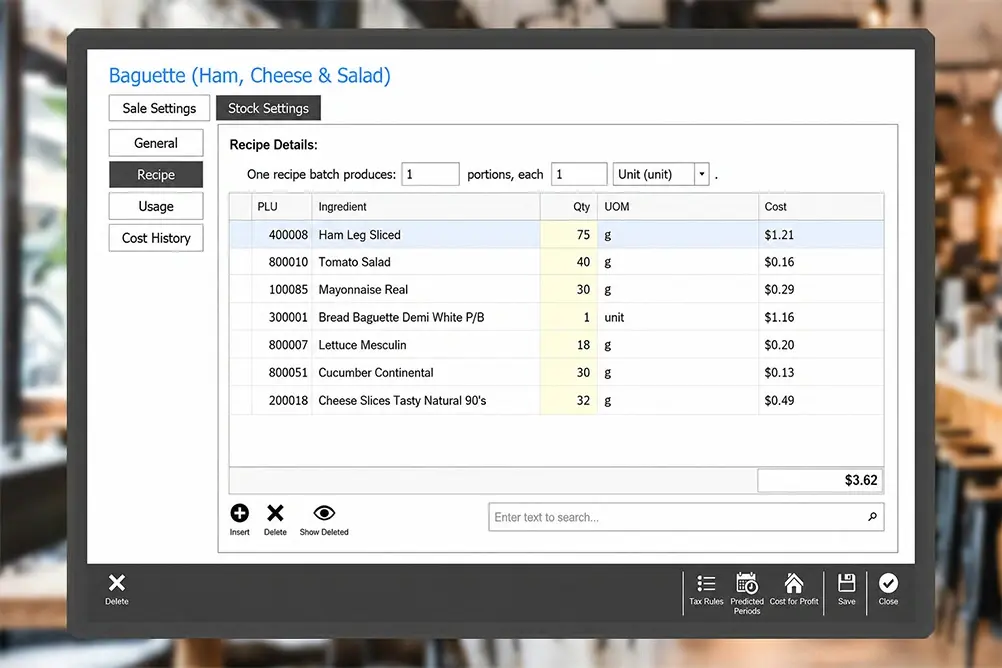
RECIPES
Link menu items to ingredients for automatic
cost calculations.

PURCHASING
Create and email purchase orders directly to your suppliers.

GOODS RECEIVING
Verify stock deliveries and track supplier price increases.
STOCK UPDATES
Automatically deducts inventory based on sales and recipes.

STOCKTAKE
Digital counts on any device with automatic calculations and variances.

WASTAGE
Record and categorise waste to understand true dead costs.

REPORTING
Variance reports, GP analysis, and sales-to-stock correlation in one place.

MULTI-SITE
Central warehouse, stock transfers, and consolidated buying, all locations.
Know Your GP. Protect Your Profit. Make Better Decisions.
PowerEPOS Stock is a comprehensive stock management system built directly into your hospitality POS.
Unlike separate inventory software, PowerEPOS Stock provides native stock control with automatic sales updates, and cloud-based multi-site management.
Day-to-day, Last Cost pricing keeps your numbers fast and current. At stocktake, First in First out accuracy gives you the true Cost of Goods your accountant actually needs.
Hospitality POS with Accurate Stock Tracking
- Stock tracking: Last Cost daily, First in First out at stocktake. The best of both.
- POS & stock system in one platform: No separate software. Sales, stock, and GP tracking in one.
- Recipe-based menu costing: When ingredient costs change, your item costs update automatically.
- Multi-location management & centralised buying: Consolidate purchasing across venues for better supplier rates while maintaining individual site stock control, transfers, and visibility.
- Stock variance reports that identify profit leakage: See where inventory is disappearing through theft, over-portioning, or waste.

Smart Stock Management Features That Save Time
- Digital stocktake on any device
Count inventory on tablets or phones with automatic calculations and variance tracking.
- Wastage & shrinkage tracking Record and categorise waste by reason to identify profit-draining patterns.
- Purchase order management
Create and email POs directly to suppliers from your POS system.
- Inter-site stock transfers
Move inventory between locations with complete tracking and visibility.
- Recipe costing with sub-recipes
Build detailed recipes that automatically calculate true menu costs.
- Sales-to-stock reporting
Compare POS sales against stock consumption to spot issues such as over-portioning.
One System, Zero Double Entry
Built into PowerEPOS, not bolted on or connected.
- All-in-one POS & inventory management system: PowerEPOS Stock is built into your POS system.
- Stock updates from POS sales: Transactions update inventory, eliminating manual adjustments.
- Single-platform stock & sales management: Update recipes, menu items, and pricing once.
- Cloud-based multi-site stock sync: Access stock data across all locations from any device.
- One hospitality management system to learn: Train staff on one system instead of separate software.
- Australian-based support for your POS stock system: One support team handles everything.
Point of Sale Stock Management Frequently Asked Questions
What is a POS with stock management?
A POS with stock management combines point of sale functionality and inventory control in a single integrated system.
PowerEPOS Stock automatically decrements inventory when sales are processed, links menu items to ingredient recipes, and provides real-time stock visibility without requiring separate stock software or manual data entry between systems.
Does PowerEPOS have inventory management?
Yes, PowerEPOS Stock provides comprehensive inventory management built directly into the POS system. Features include FIFO stock tracking, recipe costing, purchase order management, digital stocktakes, wastage tracking, multi-site stock control, and automatic stock decrementation from sales.
What is the Last Cost stock tracking?
Last Cost values your stock at the most recent purchase price for that ingredient or product. When a supplier price changes and you receive a new delivery, that new price becomes the current cost used across your daily reporting, immediately.
Every time stock moves through your venue, it's valued at the latest price you paid. No complex calculations running in the background, just a fast, current view of your costs and stock movement as it happens.
What is FIFO stock management in a POS system?
FIFO (First In, First Out) stock management tracks the exact cost of specific stock batches, assuming you use the oldest inventory first.
PowerEPOS is one of few hospitality POS systems offering true FIFO tracking, providing more accurate gross profit calculations than traditional average-cost inventory systems. This is especially important when supplier prices fluctuate frequently.
Can PowerEPOS manage stock across multiple locations?
Yes, PowerEPOS Stock provides cloud-based multi-site inventory management with central warehouse functionality, inter-site stock transfers, consolidated purchasing, and individual site reporting.
This allows restaurant groups, hospitality groups and franchises to leverage buying power while maintaining site-level stock control.
How does integrated POS and stock management save time?
An integrated system eliminates double data entry. Just add menu items, recipes, and pricing once instead of updating separate POS and stock systems.
PowerEPOS Stock automatically decrements inventory when sales occur, reducing manual stock adjustments and ensuring your POS and inventory data are always synchronised.
How long does it take to set up PowerEPOS Stock?
Initial PowerEPOS Stock setup typically takes 2-4 weeks depending on your menu complexity and number of locations. This includes importing your product list, building recipes, setting up suppliers, and entering opening stock levels.
Our implementation team provides hands-on training and works with you to prioritise high-value items first, so you can start seeing benefits immediately. Most venues are fully operational with complete recipe costing within their first month.
What happens to our existing stock data during migration?
PowerEPOS Stock can import your existing product lists, suppliers, and opening stock levels from spreadsheets or your current system, eliminating manual re-entry. Our implementation team assists with data migration to ensure accuracy. You'll conduct an opening stocktake to establish your starting point, and from that moment forward, the system automatically tracks all stock movements.
Can PowerEPOS Stock integrate with our accounting software?
Yes, PowerEPOS Stock integrates seamlessly with MYOB, automatically exporting daily sales summaries, payment breakdowns, and stock values without manual data entry. This integration ensures your financial records stay synchronised with actual stock movements and sales, eliminating reconciliation errors and saving hours of administrative work each week. Other accounting software integrations are available depending on your requirements.
Talk to an Expert
Still not sure which POS is right for your business? Want to discuss your requirements in more detail or book a demo? Well, we want to hear from you. Click the 'Contact Us' button and submit your details, call us (1300 784 666), or book a demo using our handy scheduler. We’re waiting to hear from you.